
For jewelry designers and custom studios
Track every custom jewelry commission, from first inquiry to delivery
Jewelry Studio Manager is a CRM for studios that make bespoke and made-to-order pieces. Each commission keeps its client, consultations, design files and approvals together, so you can see what stage every piece is at.
From $19 a month. Every plan has a 14-day free trial. See pricing
Not on Shopify? The web app works on its own, and its trial needs no card. Already installed? Open Shopify Admin > Apps > Jewelry Studio Manager.
- From $19/month
- 14-day free trial
- Inside Shopify admin or on the web
- Cancel anytime
- Support by email
What it does
Manage your jewelry studio's clients, commissions, consultations and design files in one place. The screenshots are from the app itself, using a sample studio and made-up clients.
Client Management
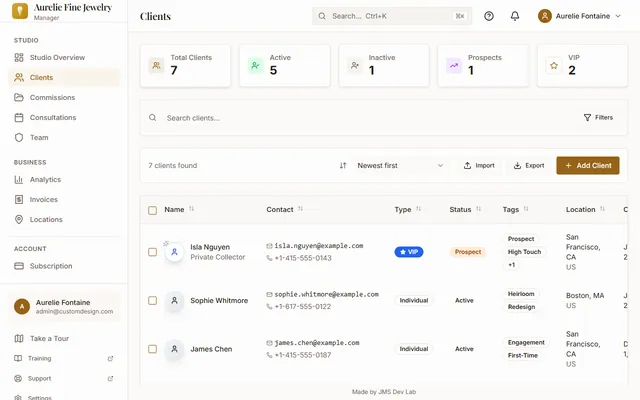
Keep detailed profiles for every client including preferences, ring sizes, metal choices, budgets, and communication history. Never lose track of a detail again.
Commission Tracking
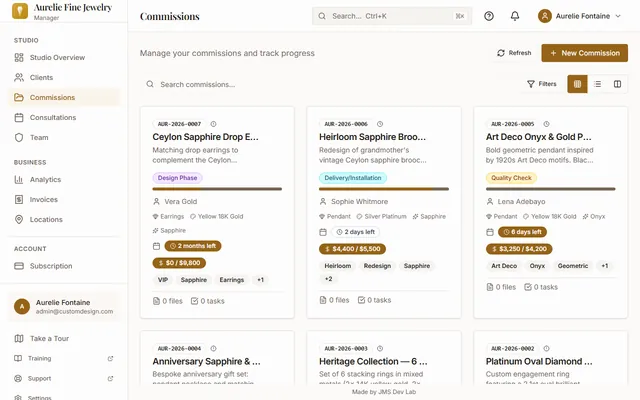
Follow every commission through your complete workflow — from initial inquiry and consultation through design, revision, approval, production, quality check and delivery.
Consultation Scheduling
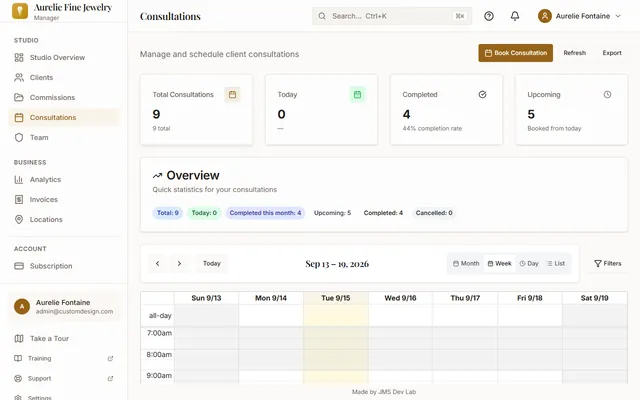
Built-in calendar with consultation scheduling and automated email reminders. Clients with a portal account can reschedule or cancel from their portal, so your studio keeps running smoothly.
Shopify Integration
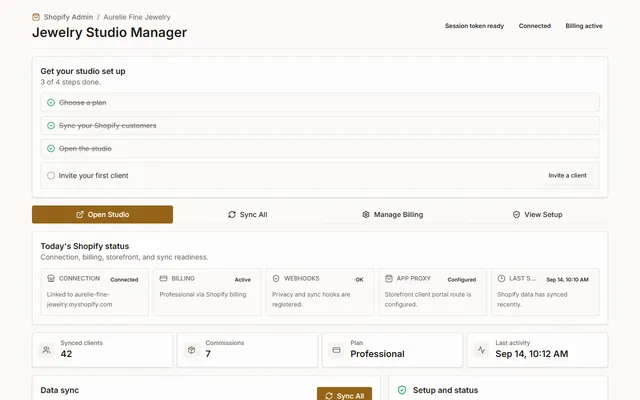
Import your Shopify customers and orders into your studio manager, and add the service products you create here to your Shopify store. Installed from the Shopify App Store, it opens inside Shopify admin.
Client Portal
Give each client their own sign-in to follow their commission and approve designs, so fewer updates go back and forth by email. Enterprise adds your logo and colour.
What clients can do in the portal
- See which stage their piece is at
- Approve a design or ask for changes, with an optional typed-name sign-off
- Reschedule or cancel a consultation
- Open the documents you share with them
- Leave feedback
On the Professional and Enterprise plans.
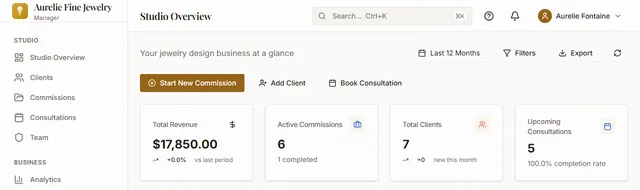
Studio Overview and Analytics
See revenue, active commissions, clients and upcoming consultations at a glance. Professional adds the Business Intelligence Hub, and Enterprise adds revenue forecasting and churn signals from your own data.
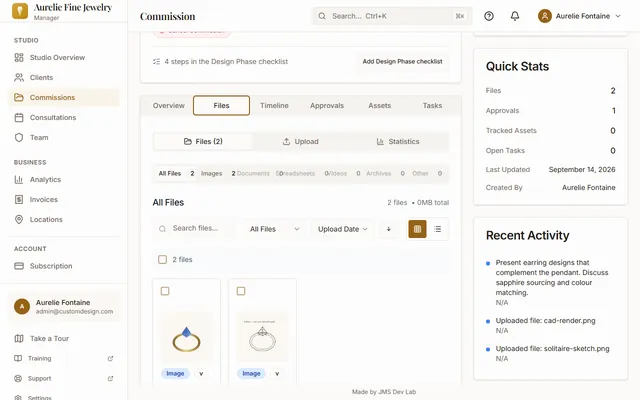
File & Design Management
Upload CAD files, reference photos, and design renders directly to each commission. Automatic thumbnails, organized galleries, and secure sharing with clients through the portal.
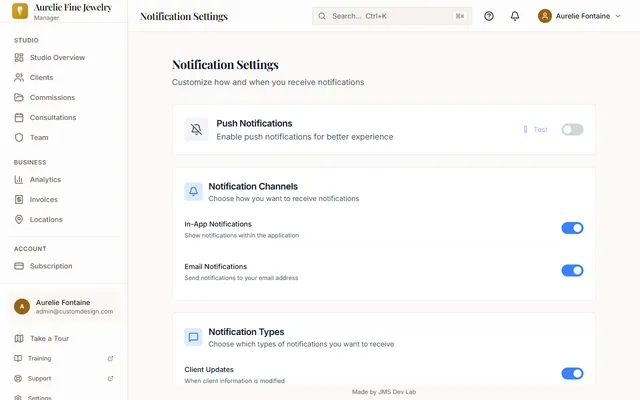
Real-Time Notifications
Get a browser push notification the moment a client updates their details or confirms a consultation, on desktop and mobile. Consultation reminders go out by email.
See it in action
Two short videos. They load from YouTube only when you press play.
More videos in the training centre.
Built for Every Jewelry Professional
Whether you specialize in engagement rings or repairs, Jewelry Studio Manager adapts to your workflow.
Custom Engagement Ring Designers
Track every detail from initial consultation through the perfect proposal moment.
Bespoke Jewelry Artisans
Manage one-of-a-kind commissions with materials tracking and client approvals.
Repair & Remodel Work
Log repairs and resets as a project type alongside your commissions and keep clients updated through the portal. Not a repair-ticketing or point-of-sale system.
Growing Studios
Manage your team, track workload, and scale your business with confidence.
How to get started
Install it on Shopify or sign up on the web. Either way, the 14-day trial starts straight away.
Sign Up or Install
Install from the Shopify App Store and approve the plan in Shopify admin, or sign up on this website with no card. Either way you get 14 days free.
Import Your Clients
Sync existing Shopify customers automatically or add clients manually. Set up your jewelry workflow stages to match your studio process.
Start Managing
Create commissions, schedule consultations, upload design files, and share your branded client portal. Your studio is now organized.
Why Jewelry Studio Manager?
How it compares with the tools most studios start with.
Spreadsheets
Flexible, but every update is typed by hand and clients cannot see progress.
- No client portal
- No automation
- No Shopify integration
- Manual data entry
Generic CRMs
Not built for jewelry workflows. No ring sizes, no commission stages, no design approvals.
- No jewelry workflows
- No commission tracking
- No design approvals
- Expensive per-seat pricing
Jewelry Studio Manager
Purpose-built for jewelers. Every feature designed for your exact workflow.
- Full client portal
- Jewelry-specific workflows
- Native Shopify integration
- Design approval system
Pricing
US dollars, per month. Every plan starts with a 14-day free trial. There is no free plan. Cancel anytime.
Starter
- Up to 50 clients
- Up to 50 active commissions
- Up to 2 users
- Basic commission tracking
- Consultation scheduling
- Email notifications
- Email support
- Push notifications & file uploads
Professional
- Unlimited clients
- Up to 10 users
- Full Shopify sync
- Client portal
- Analytics & Business Intelligence Hub
- Priority support
- Design approval workflows
Enterprise
- Everything in Professional
- Portal branding (your logo and colour)
- Multi-location support
- Revenue forecasting and churn signals from your own data
- Custom integrations & API access
- Unlimited users
- Priority onboarding & support
Installing from Shopify? Shopify bills the same three plans and also offers them yearly at about 17% off (two months free) ($190, $390 or $790 a year). Install on Shopify. Signing up on the web? The trial needs no card, and you pay by card through Stripe.
Frequently Asked Questions
Everything you need to know about getting started.
Open the Jewelry Studio Manager listing on the Shopify App Store (apps.shopify.com/custom-design-manager), click Install and approve the plan in Shopify admin. Shopify bills the plan, and the 14-day free trial applies. On Shopify the plans can also be paid yearly, at $190, $390 or $790 a year.
It is the same app. Installed from the Shopify App Store, it opens inside Shopify admin, syncs your Shopify customers and orders, and Shopify bills you. Signed up on this website, it runs on its own in your browser and you pay by card through Stripe. You can connect a Shopify store to a web account later.
There is no free plan. Every plan starts with a 14-day free trial, then costs (in US dollars) $19 a month for Starter, $39 a month for Professional or $79 a month for Enterprise. If you sign up on this website you do not need a credit card to start the trial. On the Shopify App Store the same plans are also offered yearly, at $190, $390 and $790.
No. You can sign up on this website and use Jewelry Studio Manager as a standalone web app, billed through Stripe. It is also available as a Shopify app. If you connect a Shopify store, your Shopify customers come in as clients, and you choose which Shopify orders become commissions: orders tagged "commission" (the default), all orders, or none.
Yes. You can upload your client list as a CSV file (up to 1,000 clients per file, within your plan's client limit). If you connect a Shopify store, you can sync your existing Shopify customers in as clients, and new or updated Shopify customers keep arriving automatically.
Starter allows up to 50 clients, 50 active commissions and 2 users. Professional and Enterprise have unlimited clients and commissions. Professional allows up to 10 users and Enterprise has unlimited users.
Yes, on the Professional and Enterprise plans. The client portal lets clients follow the progress of their commissions, approve designs or ask for changes, reschedule or cancel consultations, leave feedback and open the documents you share with them. The Starter plan does not include the client portal.
Yes, on the Professional and Enterprise plans. You send a design to the client, who approves it, rejects it or asks for changes in the client portal. You can require the client to type their name to sign off, and each approval is recorded on the commission.
No. Jewelry Studio Manager has no accounting integration. It keeps orders and produces PDF invoices for your commissions, which you then record in your accounting software yourself.
Yes. Cancel from the Billing page in the app, or in Shopify admin if you pay through Shopify. There are no cancellation fees and no lock-in contracts. If a standalone trial or subscription ends unpaid, nothing is deleted and you can still reach your records, but the account is restricted (one user, no adding beyond 50 clients or 3 active commissions, paid features off) until you subscribe again. This is not a free plan.
We use HTTPS, secure HTTP-only sign-in cookies, browser-origin and CSRF protections, and AES-256-GCM encryption for stored Shopify access tokens and any optional third-party provider keys you configure. You can ask us to access, correct, export or erase your data; see our Privacy Policy for details.